| ||||||||
|
I’m excited to share a set of mobile apps I’ve recently completed and published on both the Google Play Store and the Apple App Store. These apps are designed with a simple goal in mind: to make meaningful, structured content more accessible, whether you’re studying theology or improving your English vocabulary. 📱 Now Available on Both Platforms All apps are live and available for download: Google Play Developer Page: https://play.google.com/store/apps/dev?id=5835943159853189043 Apple App Store Developer Page: https://apps.apple.com/ca/developer/q-z-l-corp/id1888794100 📖 Theology & Confession Study Apps For those interested in Reformed theology and classical Christian teachings, I’ve developed a series of apps that present foundational texts in a clean, focused reading format: The Belgic Confession Canons of Dort Heidelberg Catechism Westminster Shorter Catechism Each app is designed to provide a distraction-free experience, making it easier to read, reflect, and revisit these im...
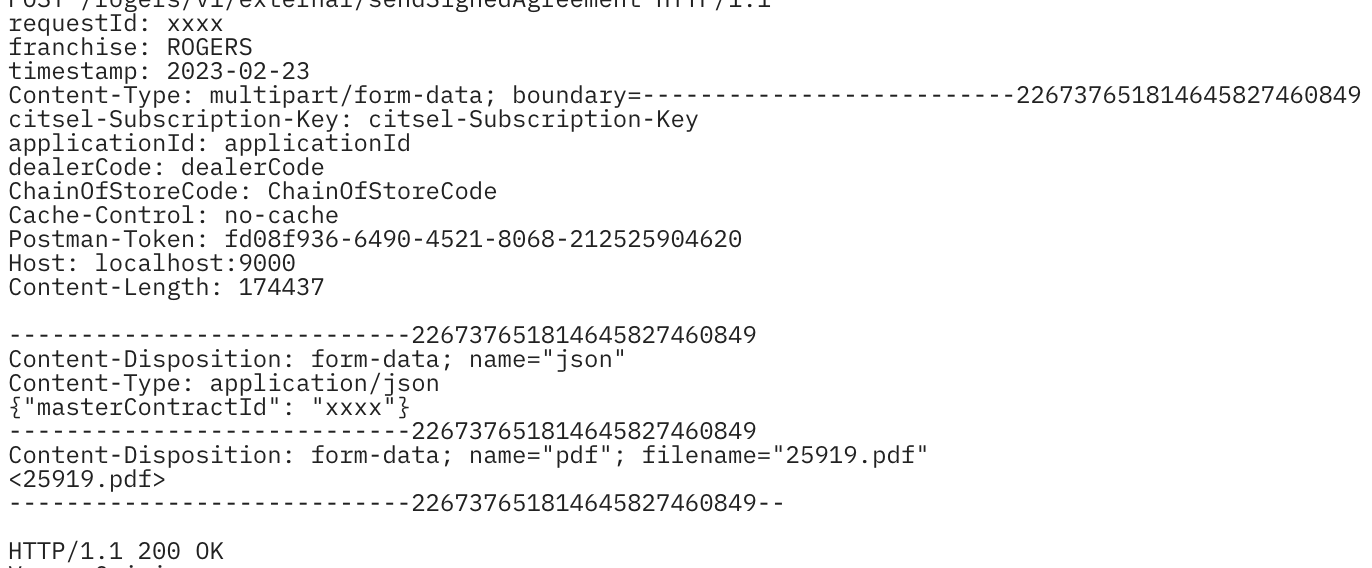
How to Prepare the body of a multipart request in Sprint Boot
- Get link
- X
- Other Apps
By
Errong Leng
-
Prepare the body of a multipart request, resulting in a MultiValueMap<String, HttpEntity>. Parts may be concrete values or via asynchronous types such as Reactor Mono, Flux, and others registered in the ReactiveAdapterRegistry. This builder is intended for use with the reactive WebClient. For multipart requests with the RestTemplate, simply create and populate a MultiValueMap<String, HttpEntity> as shown in the Javadoc for FormHttpMessageConverter and in the reference docs. use MultipartBodyB
| |
❤️ Support This Blog
If this post helped you, you can support my writing with a small donation. Thank you for reading.
- Get link
- X
- Other Apps
Popular Posts
A New Collection of Thoughtful Learning Apps — Now Available on iOS & Android
By
Errong Leng
-
I’m excited to share a set of mobile apps I’ve recently completed and published on both the Google Play Store and the Apple App Store. These apps are designed with a simple goal in mind: to make meaningful, structured content more accessible, whether you’re studying theology or improving your English vocabulary. 📱 Now Available on Both Platforms All apps are live and available for download: Google Play Developer Page: https://play.google.com/store/apps/dev?id=5835943159853189043 Apple App Store Developer Page: https://apps.apple.com/ca/developer/q-z-l-corp/id1888794100 📖 Theology & Confession Study Apps For those interested in Reformed theology and classical Christian teachings, I’ve developed a series of apps that present foundational texts in a clean, focused reading format: The Belgic Confession Canons of Dort Heidelberg Catechism Westminster Shorter Catechism Each app is designed to provide a distraction-free experience, making it easier to read, reflect, and revisit these im...

2023, New Start! New AdSense Account! New Earnings!
By
Errong Leng
-
It's been a while after I created adsense account to display ads on this blog. A few years later the payment finally reached my payout threshold, I just found the existed adsense account is bind to China. but I moved to Canada 3 years ago. I tried to change the country of it, but just found Unfortunately it's not possible to change the country of your payment address in AdSense. If you've moved to a new country or territory, you'll need to cancel your existing AdSense account and create a new AdSense account . So I created a new adsense account today on 2023-01-12. Though new account is still under reviewing, I believe it will be approved soon. To reach out payout threshold in this year, I set up the below plan: write one blog per week day!!! write one blog per week day!!! write one blog per week day!!! Try ingress more traffic to this blog
react-native run-android : do not build/update modified code(App.js)
By
三好Daddy
-
Solution react-native bundle --platform android --dev false --entry-file index.js --bundle-output android/app/src/main/assets/index.android.bundle --assets-dest android/app/src/main/res c:\Users\lenger\Desktop\webrowser>react-native bundle --platform android --dev false --entry-file index.js --bundle-output android/app/src/main/assets/index.android.bundle --assets-dest android/app/src/main/res Scanning folders for symlinks in c:\Users\lenger\Desktop\webrowser\node_modules (43ms) Scanning folders for symlinks in c:\Users\lenger\Desktop\webrowser\node_modules (38ms) Loading dependency graph, done. bundle: start bundle: finish bundle: Writing bundle output to: android/app/src/main/assets/index.android.bundle bundle: Done writing bundle output Run react-native run-android again, you will find your modification work.


Comments
Post a Comment